Wanxiang Pinyin packages dictionaries, a grammar model, and pinyin configuration into one Rime Chinese input schema. It serves full-pinyin users and also offers double-pinyin and auxiliary-code paths. The v18.1.4 download page lists four editions; you still need to download the grammar model separately at install time. Before trying it, separate what the schema pack, the front end, and the model each do. Assembled from repo docs; not on-device tested.
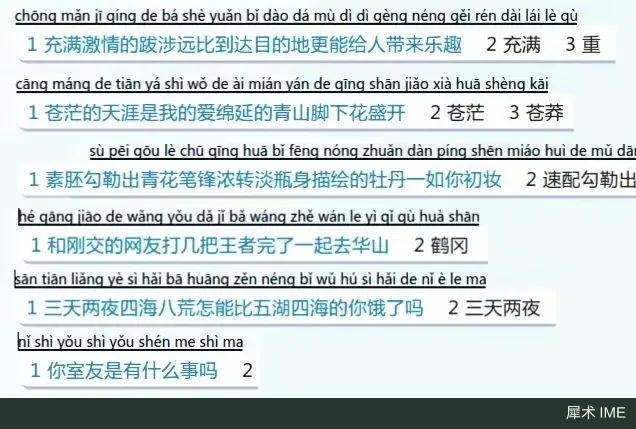
Schema positioning and maintenance progress
Wanxiang Pinyin is maintained in GitHub user amzxyz’s rime-wanxiang repository[1]. It is an open-source Chinese pinyin schema on the Rime engine. It supplies dictionaries, schema config, and Lua extensions; the candidate window and system keyboard remain the front end’s job. The repo uses a CC BY 4.0 license[3]; at check time the page showed about 4.9k stars—star counts change.
The README[12] lists the Wanxiang dictionary as the base and links to the RIME-LMDG project, saying that after AI and corpus optimization it has entered a manual-maintenance phase; that describes the dictionary-curation stage, not that the schema stopped being maintained. The v18.1.4 download page[2] is marked Latest; listed updates include dictionary adjustments and transcription fixes. The visible page date is 17 October; this round’s materials are labeled 2026; the page fragment did not show the year separately.
The mounted repo snapshot for this article is ed55bd5, with commit message “chore: 完善plum安装说明”. The commit page failed to load; the latest commit date was not verified—do not substitute scrape time.
Input capabilities and the four editions
Per the dictionary and model docs[5], the project continually culls low-quality entries, corrects readings, and organizes common expressions. Tone marks, word frequency, and the grammar model jointly shape candidate order; what is introduced here is design intent—whether candidates feel more habitual still needs real use.
Input modes include full pinyin and double pinyin such as Ziranma and Xiaohe, using one unified main schema switched via Custom patches; mixed Chinese–English input, reverse lookup, and similar features are also available. Pro further offers several auxiliary-code sets that filter homophones with extra codes; the auxiliary-code docs[6] distinguish direct and indirect auxiliary codes, and the concrete character-splitting rules vary with the chosen sub-pack.
Per the selection notes in the README[1] and Release[2]:
| Edition | Main differences | When to choose |
|---|---|---|
| Base | Full toned dictionary and Lua features; full and double pinyin | Default for a first try |
| Lite | Untoned dictionary; some Lua modules trimmed; download includes T9 | Want less feature weight |
| Pure | Slim dictionary; no Lua | Old systems, old Rime, or no-Lua environments |
| Pro double-pinyin auxiliary-code enhanced | Independent full config and auxiliary-code dictionaries, packaged by auxiliary-code type | You already know you need double-pinyin auxiliary codes |
Pure without Lua does not mean you skip the model; that edition’s Release still requires all four editions to download the grammar model separately.
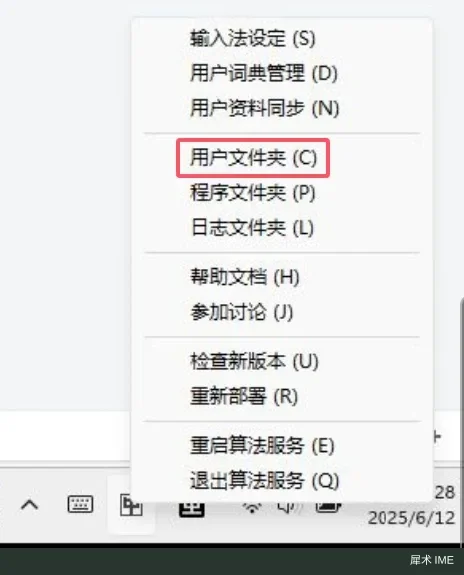
Supported front ends and install methods
The project’s quick-start docs[4] give guidance for Windows Weasel, macOS Squirrel, Linux Fcitx5 Rime and IBus Rime, Android Trime, and iOS Hamster. Being listed does not mean every old front-end version works; for example the Linux guide[10] asks you to watch Lua, Octagram, and other dependencies.
Manual install can follow this order; exact paths and button names follow each platform’s docs:
- Install the matching Rime front end; back up existing user config and learning data.
- From the v18.1.4 download page[2] pick one schema pack; for Pro, pick by auxiliary-code type.
- Via the grammar-model entry on the download page, or the model download link in the Weasel docs, separately download
wanxiang-lts-zh-hans.gram. - Put the archive’s internal files and subdirectories into the current front end’s Rime user directory, keep the internal structure, and do not wrap an extra pack-name folder; place the model and schema files in the same root. Weasel’s default is
%APPDATA%\Rime; Fcitx5 Linux defaults to~/.local/share/fcitx5/rime. - Check the global schema list and any existing Custom patches; enable Wanxiang as needed. If you already have personal settings, reconcile before deciding whether to overwrite global or front-end config. Run “Deploy,” wait for compilation, then select the schema.
If you prefer the command line, Plum (Dongfengpo)[7] is available: project docs provide a customized plum branch. Install the front end first, clone and enter that directory; first Base install is bash rime-install amzxyz/rime-wanxiang@wanxiang-base:plum/full; Windows needs Git Bash. The model is still prepared separately per the Release. After later switching pinyin type or editing Custom patches, redeploy.
Xishu IME is also based on librime and can import Rime schema packs following cross-platform schema import[11]. That doc requires separate checks of models, extensions, and host Lua interfaces; this article did not install or run Wanxiang inside Xishu IME and does not claim verified compatibility.
References
-
Auxiliary-code system explained: precise character selection
-
Image sources and licenses: the hero is a public screenshot from the amzxyz / rime-wanxiang project’s README “效果预览”; the body figure is that repo’s Weasel “user folder” entry screenshot, with a red box marking the tray-menu user-folder entry. Both are attributed under the repo’s CC BY 4.0 license and converted to WebP by the import service; they are the project’s public screenshots, not on-device test records for this article.
-
Information compiled and published by the Scholay academic one-stop platform; report infringement for takedown.
-
Also published on Enter Scholar, a scholars’ community for the intelligent age
