After an input schema is updated, short codes you used often may stop appearing. Do not start by typing every word again. At commit 9ee4647, rime-flypy, maintained by cubercsl, changes the entrance of the user dictionary. The old files may still be in the user-data folder, while the new schema no longer reads them. The key to finding the entries again is to move the original words and codes to the new entrance, and to keep their candidate order relative to the main table. [1][2]
Give pinned words and ordinary words a place each
This repository arranges the Xiaohe shape-and-sound table as a Rime configuration for Linux, and it also offers a separate fcitx5 table route. This change is in the Rime schema of that implementation. The new version reads two local text tables at the root of the Rime user-data folder. flypy.user.top.txt holds words that should rank ahead of the main table. flypy.user.txt holds words that should rank after the main table. Both files are created by the user. The schema package does not supply them, so a later schema upgrade will not overwrite them with an empty table from the repository. [1][2]
Which table to use depends on whom you want to see first when the code is the same. A short name typed over and over in daily work, if it should deliberately press down the original schema’s candidate, can go in the pinned table. An alias used only occasionally can stay in the ordinary table and leave the previous first choice in place. Do not drop every old entry into the pinned table. A word that used to commit directly on a code may, after the move, need to be paged to. The feel of actual use changes with that. [1][2]
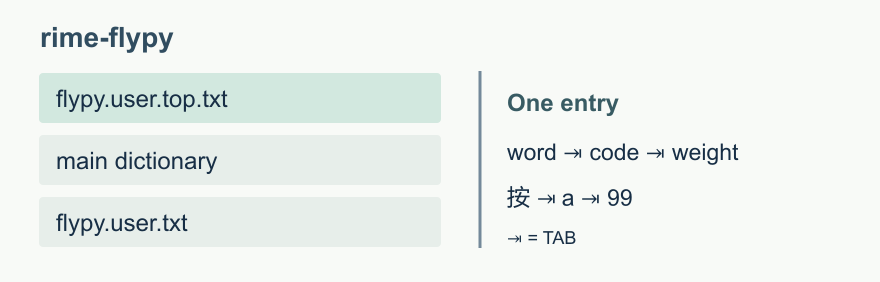
Figure: where a local user entry sits, and its fields.
Move only the entry area out of the old files
First find the old flypy/flypy.user.top.dict.yaml and flypy/flypy.user.dict.yaml. According to the repository, a Plum upgrade keeps these two files if they are already in the user-data folder. Remaining on disk does not mean they still have an effect on input. Keep a copy of the old files first. Then open each one, and from the line after the ... that marks the end of the YAML header, copy the actual entries. The old pinned table goes into the new pinned table. The old ordinary table goes into the new ordinary table. The new text files do not need a YAML header. [1][2]
Each line is ordered as entry, code, and an optional integer weight. Between fields, press a real Tab key once. Do not type the three letters Tab, and do not line the columns up with runs of spaces. In the explanation, the word 按 is paired with the code a and may also carry the weight 99. Another line may have only the word and the code. If the editor expands Tab into spaces, change to an input method that can keep tab characters. If only some words appear after a long table is moved, check the field separators on those lines first. That locates the problem more easily than adjusting weights again and again. [2]
After deploying, check with two candidates that share a code
Save the two tables and deploy Rime again. Switch back to an input environment that uses this schema, and type the code of one pinned word and one ordinary word. It is best to choose examples that share a code with a candidate already in the main table, so you can see both whether the word appears and whether it falls before or after the main table. After the words you use often and their candidate order are confirmed, decide how to archive the old YAML backup. What is described here is the Rime configuration after that commit, including the case of loading this schema through fcitx5-rime. The separate fcitx5 table-generation script has its own input list. A redeploy on the Rime side does not let you infer that the packaged table will also carry a private word list. [1][2][3]