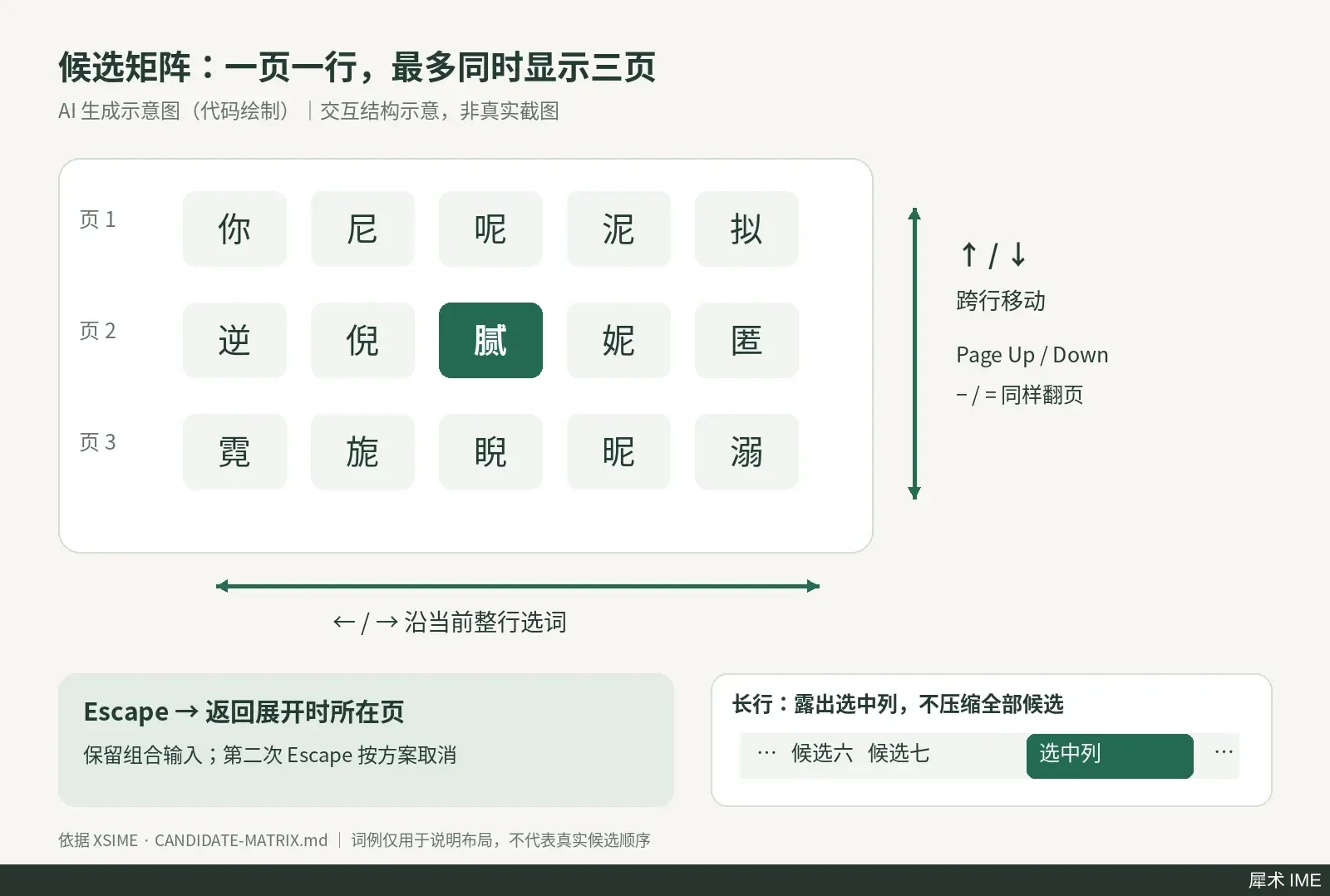
When there are many candidates, what is there besides turning the page again and again? The Xishu IME candidate matrix opens the engine’s pages as rows. At most three pages show at once. Left and right choose a word. Up and down change the row. Escape returns to the page from before the matrix was opened. Horizontal and vertical layout are another layer of appearance. This account follows the repository documents. It was not tried on a machine. It describes this desktop interaction and the boundary with a Rime schema and the user’s dictionary.

Layout, and opening the matrix
In the repository snapshot consulted here (7ef780d), the XSIME project sets two layers of behavior for the desktop candidate window in CANDIDATE-MATRIX.md. The first layer is the compact window. Appearance settings can choose horizontal or vertical, and that choice is saved locally. The second layer is the expanded matrix. When the engine has candidates on more than one page, the down key opens the matrix. The viewport holds at most three pages, one page to a row. When the selection keeps moving past what is shown, later rows are fetched.
The limit of “three pages” is how many pages can be seen at once. It does not mean there are only three pages of candidates in all. Horizontal layout, vertical layout, and the matrix should not be treated as one switch. The first decides the direction of the compact window. The second gives room to look across pages. That split gives appearance and the act of finding a word each a clear entrance.
Choose along a row, and turn pages across rows
Once it is open, the left and right keys move along the whole current row. When a page’s candidates run past the available width, the window brings the selected column into view, rather than squeezing every word into a tiny cell. A long word, and a candidate further along, still has a place that can be reached.
The up and down keys, and Page Up and Page Down, move between matrix rows. Minus and equals do the same page-turning. Pressing up again on the first row, or pressing Escape in the matrix, returns to the page that was current when the matrix was opened, and keeps the input being composed. A second Escape follows the input schema’s ordinary cancel path. The “starting page” here is the page you were on when you opened the matrix. It should not be written as the first page of candidates.
Space commits the highlighted candidate. The digits 1–9 choose only the visible candidates on the active row. They do not number the whole matrix as one list. A mouse selection also keeps the real engine page and the index within that page. Ordinary Return still follows the platform’s original input behavior. Combinations with modifier keys keep the schema or host binding.
The boundary between appearance settings and the dictionary
The documents say expressly that the horizontal or vertical candidate setting is saved locally. It does not rewrite a Rime schema, and it does not rewrite the user’s dictionary. Under that contract, the change is in how candidates are shown and how you move among them. A position in the matrix still has to correspond to the engine’s original page and candidate index. Changing the direction of the layout cannot be understood as changing the input schema, or as a tidy of the dictionary.
That boundary is about the appearance setting itself. It does not mean the dictionary can never change during input. What a user can take as a promise is this: in order to change how candidates are arranged, this setting does not have to rewrite the schema or the user’s dictionary.
The document’s contract, and the limits of each platform
The platforms do not carry the matrix in the same way. The documents say macOS keeps using an AppKit panel that does not activate the app. Windows uses a negotiated TSF panel, and a UI-less app keeps control of its own presentation. On Linux the compact candidates are still presented by Fcitx, and after expansion a native GTK matrix is used. If a Linux session has neither usable layer-shell support nor a usable XWayland display backend, Fcitx candidates and keyboard navigation remain, but the custom matrix cannot be shown. That cannot be turned into a claim that every desktop environment looks the same.
DesignSystem/README.md gives another limit on how to read the material. The React design master is for discussing, trying, and freezing visual and interaction rules. Main interactions such as choosing a candidate are simulated locally. They do not read a real input focus, and they do not replace the AppKit or InputMethodKit runtime. The master canvas can help in understanding the interaction. It cannot stand in for a screenshot of a real input method running, or for an acceptance result.
The repository lists regression coverage for each platform, and it says expressly that automated tests and a source build cannot replace acceptance on a Windows app and a Linux compositor. This article only arranges the behavioral contract in the documents. It was not installed and run, and these items are not written as tests completed by this article.
References
- Candidate layout and matrix interaction, CANDIDATE-MATRIX.md: candidate layout, matrix navigation, commit rules, platform boundaries, and regression coverage.
- RIMES Design System, DesignSystem/README.md: what the design master is for, local simulation, and the boundary with the native runtime.
The links are pinned to the commit checked here, 7ef780da42150705ac8c4d12ae52d03dbbb58050, so a later change on main does not move the source.
References
-
Compiled and published by Scholay. For a takedown request, send feedback.
-
Also published at Enter Scholar.