For someone who wants to type simplified Chinese with Rime and does not want to start from an empty configuration, rime-ice is an open-source scheme worth knowing. It gathers full pinyin, common double-pinyin schemes, a Chinese-English dictionary that is still being checked, and extra functions, for use with different Rime front ends. This article follows the repository documents. It was not tried on a machine. It says what the scheme provides, which clients it fits, and how to download and install it.

The article does not state a separate license for this picture.
A Rime configuration that is still maintained
Rime-ice is a simplified-Chinese Rime configuration maintained in iDvel’s repository. It includes input schemas, dictionaries, and accompanying functions. Using it still requires a Rime client. The repository README[1] presents it as a configuration that works out of the box and offline. The repository is marked with the GPL-3.0[5] license.
Maintenance is not the author’s alone. The commit history[6] shows community contributors still revising vocabulary. The record seen at the top of the page on the reading for this article was 859e3b5 of 10 September 2026, a vocabulary change by Lithium-7. Because the page may be cached, that does not confirm there had been no later update on the day it was read.
Checked again on 21 November 2026. The GitHub API for main then returned 927e1cf1d3, dated 11 November 2026, by Lithium-7, with the message “dict(cn): 增改词汇 (#1646).” That is one later commit, not a full reading of the history, and this article was still not tried on a machine.
The dictionary, double pinyin, and auxiliary codes
One emphasis is maintenance of the dictionary. The credits[3] list sources including the Table of General Standard Chinese Characters, Unihan, a list of common words in modern Chinese, the Huayu Yefeng dictionary, the simplified-character baguwen material, Tsinghua University’s open dictionary, and Tencent word vectors. Each source’s license should be read on its own. The repository’s overall license is not the only license of every upstream source.
The schemas include full pinyin and the double-pinyin schemes Ziran, Xiaohe, Microsoft, Sogou, Smart ABC, Pinyin Jiajia, and Ziguang. The README also lists mixed Chinese and English, emoji, fuzzy sounds, automatic correction, traditional/simplified conversion, lookup by components, and auxiliary-code lookup. A character you cannot pronounce can be looked up from the pinyin of its parts, and when there are many candidates the pinyin of a radical can narrow them. Those are abilities the documents list. This article did not measure candidate accuracy or typing speed. Function notes
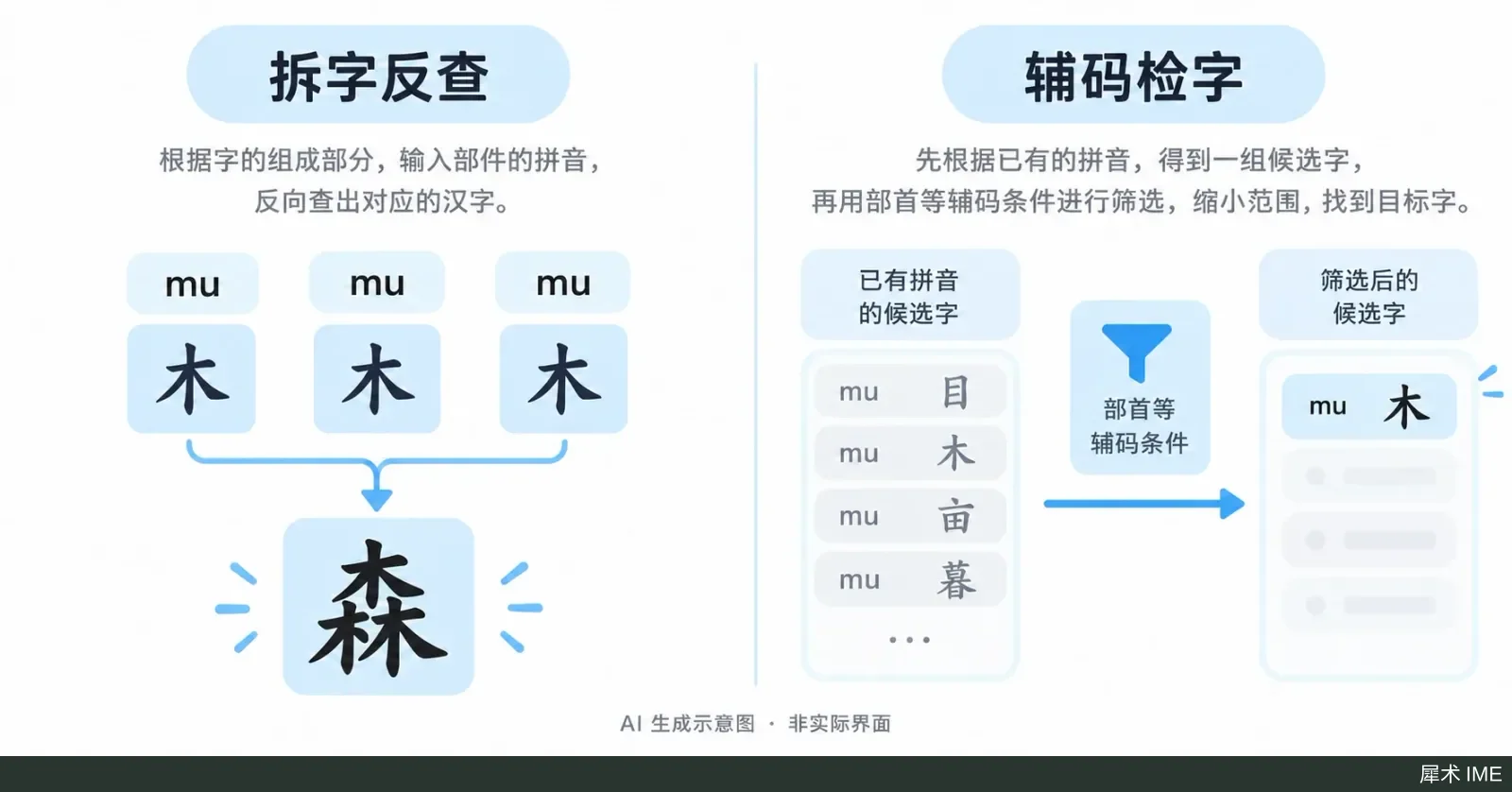
The article does not state a separate license for this diagram.
Choose a client, then install the scheme
The installation guide[2] requires a client that provides librime 1.8.5 or newer and includes librime-lua. Some functions may require a higher version. The README names Weasel (Windows), Squirrel (macOS), and Fcitx5 and iBus (Linux). The guide also lists the Hamster input method and says rime-ice is already built in. The installation guide as read does not clearly list Trime, so this article does not write Trime as a front end that has been checked. Skins, layout, and which functions a client supports still have to be confirmed separately.
A manual install can follow this order:
- Install a Rime client suited to the system, and back up the existing user directory, especially custom configuration and learned data.
- Open the nightly download page[4] and choose
full.zip. The page says it contains all dictionary and schema files and is packed automatically after each commit. - Follow the README’s full-replacement method: empty the user directory, then copy in the unzipped files and subdirectories. This is the client’s user directory, not the program’s install directory. If there is already a configuration, confirm that the backup can be used.
- Run “redeploy” in the client. On the desktop,
F4can show the schema and function menu.
Someone comfortable with the command line can also use plum. Install git and bash, clone https://github.com/rime/plum.git, enter the plum directory, run bash rime-install iDvel/rime-ice, and redeploy. Default directory detection is aimed at Weasel, Squirrel, and iBus-rime. Other front ends need rime_dir set to the actual location. A double-pinyin user should also apply the corresponding schema patch from the README, and should not copy only the full-pinyin steps. README install commands
References
- Rime-ice GitHub repository and README
- Installation guide
- Credits for the dictionary and functions
- Nightly packing and download
- GPL-3.0 license text
- Commits on main
References
-
Compiled and published by Scholay. For a takedown request, send feedback.
-
Also published at Enter Scholar.