To move from full pinyin to double pinyin, Xishu IME already includes the natural-code and Xiaohe schemas. The repository’s default configuration places them after rime-ice full pinyin. The main dictionary of all three points at rime_ice. This article says how to switch by the configuration, where a shared dictionary stops, and how a beginner can practice in steps. It follows the repository documents. It was not tried on a machine.

Where the schemas sit, and how to turn one on
The README ability table[1] lists the two double-pinyin schemas. The schema list in default.yaml[2] is, in order, rime-ice pinyin, natural-code double pinyin, Xiaohe double pinyin, Wubi 86, Xishu Wubi, and English. Natural code and Xiaohe are the second and third items. That is the repository’s default order. After an upgrade, or after the configuration is edited, the order in a client may differ.
With a physical keyboard, switch to XSIME and give a text field focus, then press F4, as the configuration lists, to open the schema menu, and choose natural-code double pinyin or Xiaohe double pinyin. The configuration also lists Control and the backtick, and Control-Shift and the backtick. Both schemas are already in the default list. They do not need a separate import, and the chord extension does not need to be turned on. That is the method the configuration lists. The interface entrance and the shortcut response on each platform were not tried on a machine. A phone cannot copy the physical-keyboard steps.
Where a shared dictionary stops
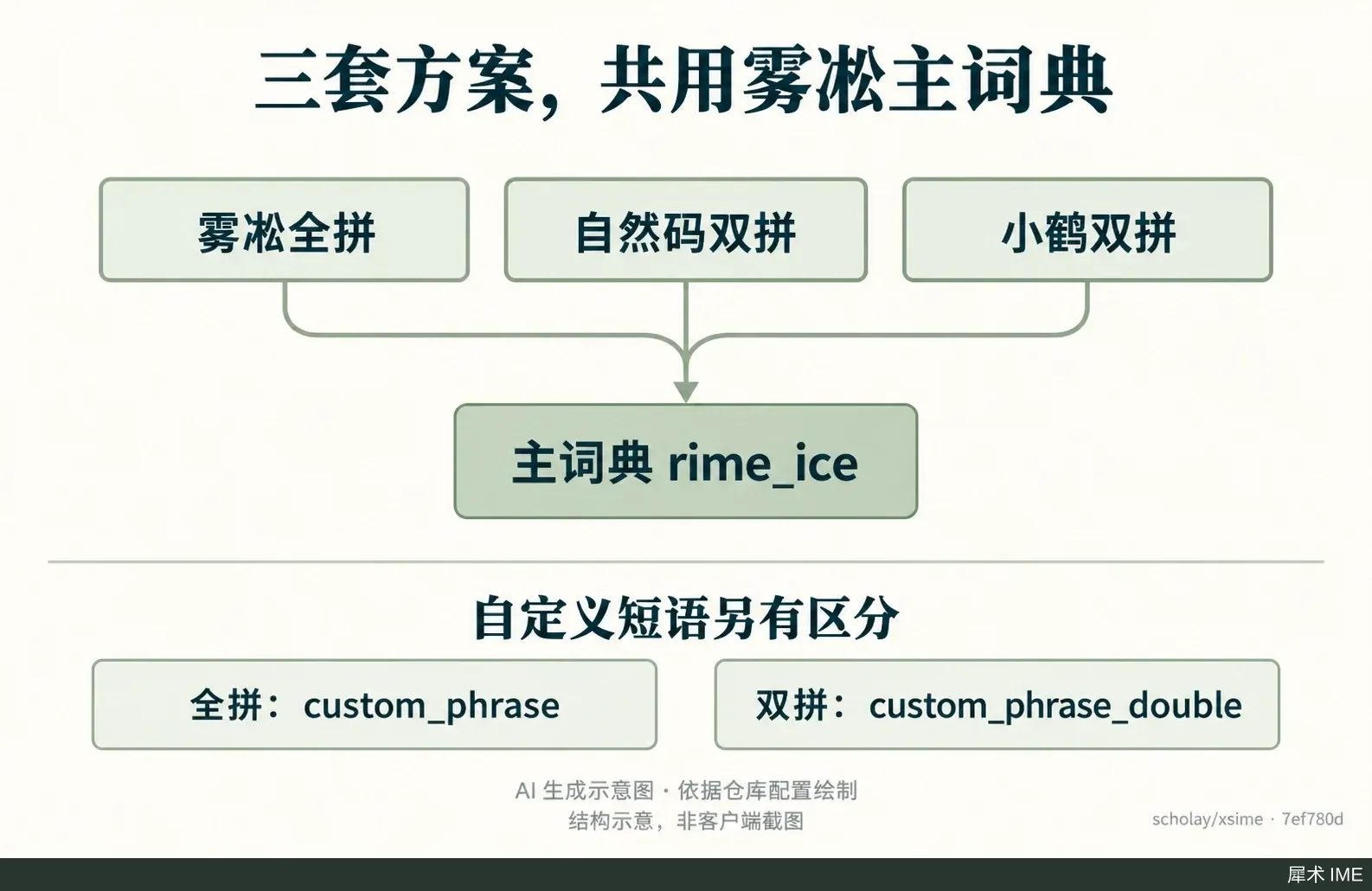
The main translators of natural code[3], Xiaohe[4], and rime-ice full pinyin[5] are all configured with dictionary: rime_ice. Switching to double pinyin still uses the rime-ice main dictionary. The main change is in the spelling rules, speller/algebra, and in the display conversion, translator/preedit_format.
A shared main dictionary does not mean every setting is the same. Full pinyin custom phrases use custom_phrase. The two double-pinyin schemas use custom_phrase_double. The configuration notes that custom_phrase_double.txt has to be created by hand. Mixed Chinese-English vocabulary also points at different data files. The double-pinyin configuration also hints that some derivations of English symbols, and some component-splitting spellings, cannot adapt automatically. The same main dictionary is not a promise that personal word frequency, user-coined words, and phrases move across with no difference.
Moving over from full pinyin slowly
A beginner should pick one double-pinyin schema to practice, and keep rime-ice full pinyin for emergencies. Learn the initials, finals, and zero-initial codes of the chosen schema first, then practice with words and short sentences that are typed often. When something is forgotten, look at that schema’s key table. Do not mix the natural-code and Xiaohe mappings. When time is short, switch back to full pinyin. Widen the range after the syllables used often are familiar.
Look first at whether the table is consulted less often and fewer corrections are made, and only then at speed. Do not set a deadline of a few days to learn it, or a promise that speed will rise. If there are many custom phrases, keep the original configuration, and then check the double-pinyin phrase file and its codes on their own. The above is advice for the transition. It is not a conclusion of a test in this article.
References
Snapshot checked: scholay/xsime, commit 7ef780d.
- README.md
- rime-data/default.yaml
- rime-data/double_pinyin.schema.yaml
- rime-data/double_pinyin_flypy.schema.yaml
- rime-data/rime_ice.schema.yaml
References
-
Compiled and published by Scholay. For a takedown request, send feedback.
-
Also published at Enter Scholar.