Moving to Xishu IME does not mean configuring a familiar Rime schema from nothing. The import range listed in the repository documents covers macOS, iOS, Android, Windows, and Linux, and it supports schema source files and UTF-8 text dictionaries that include codes. Being able to import a schema does not mean a skin, a model, and the experience on every platform can be moved together. This account follows the repository documents. It was not tried on a machine.

Schema files and text dictionaries
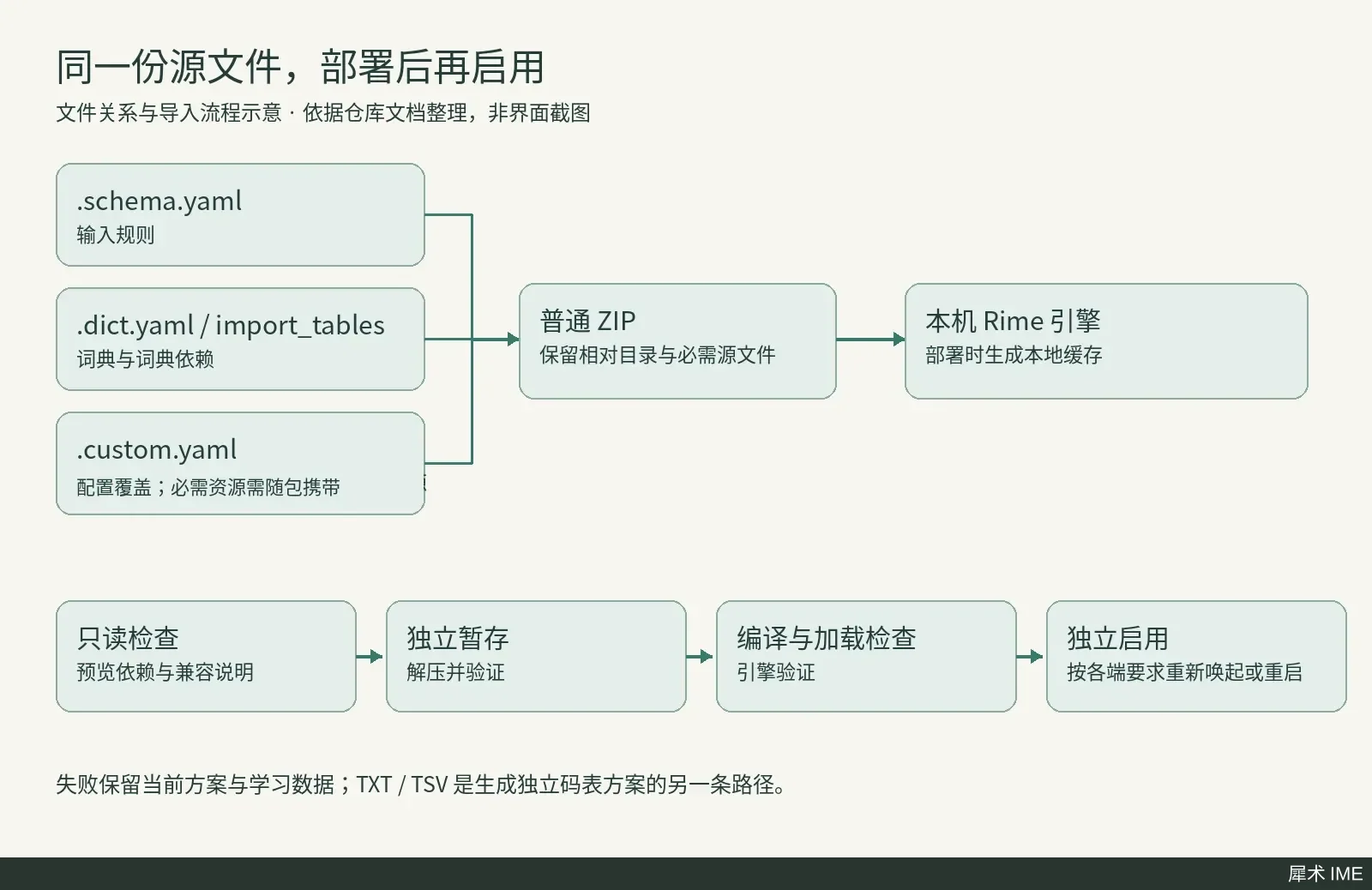
Separate three kinds of file first. A .schema.yaml describes the input rules. A .dict.yaml and import_tables organize the dictionary. A .custom.yaml overrides configuration. On deploy, the engine rebuilds the cache on this machine. So moving a schema means bringing the source files and the dependencies they need, keeping the original relative directories, and packing an ordinary ZIP. Do not substitute the build, sync, or user database from another device for the source files. The documents say those caches and private states are ignored. An upstream package with no extra manifest can still be imported.
Dictionary files have two different paths. A standard .dict.yaml should go into the ZIP with the matching .schema.yaml. A dictionary file on its own is not treated as a complete schema. A general TXT or TSV is prepared as entry, tab, code, tab, optional weight, in UTF-8. After import it becomes a separate code-table schema. A word list of characters only, with no codes, cannot be read as sound or shape codes by guessing. The codes have to be added, or a suitable conversion chosen.
Entrances on five platforms, and how a schema is turned on
The five platforms handle the same schema package, but the entrance and the action that makes it take effect differ.
- iOS and Android: open “Rime schema package and import” in the app settings, choose, deploy, and enable, then bring the keyboard up again. Android compiles in a separate import process.
- macOS: Settings, Input method, Import and manage schemas. Enable after compiling, then restart the input method.
- Windows: enter the same way, through Import and manage schemas. After compiling and enabling, save the Buffer first, then quit from the tray and start again.
- Linux: enter from the Fcitx5 input-method configuration, or from “Xishu IME · schema management” in the application list. After compiling and enabling, restart Fcitx5. That is the entrance of the RIMES Fcitx5 plugin. The older data-preview installer still only installs data for other Rime front ends.
Import, compile, and enable have to be kept apart. As the documents describe it, the importer previews and stages first, then compiles and checks the load with the local Rime engine, and only publishes to the schema library after success. Enabling is still a separate action. Failure does not change the current schema, the learned dictionary, or user settings. Deleting an imported package also keeps the user’s learned data.
Models, skins, and limits of the host
This range does not include conversion of proprietary dictionaries or third-party keyboard skins. Importing a keyboard layout is also separate from importing a schema. Full pinyin, double pinyin, Wubi, Cangjie, and similar categories have representative schemas. That does not mean every third-party distribution in the category is compatible. Required source files and dependencies such as Lua and OpenCC have to be complete. Host-only interfaces and native extensions still have to be checked.
Models need particular care. The shared base range of the five platforms does not include .gram language models. A ZIP that contains a model is refused expressly. Input validation of the Wanxiang base package does not prove a “small model” ability. Mobile Lua also has limits on directory access and on an execution budget. It cannot run system commands or load native modules. Host-only APIs on desktop front ends, touch layouts, and chord-on-key-release also need the corresponding host. When choosing a package, look at the particular dependencies and the compatibility note.
Tests on each platform, and the limit of acceptance
The repository records a set of regressions with the unmodified Wanxiang v18.1.1 base package, but the evidence is not the same on each platform.
- iOS: the simulator checked the original package, deploy, and real-engine candidates and commit for full pinyin and nine-key. That is not acceptance on a physical device.
- Android: the JVM checked ZIP inspection and staging. The simulator checked actual JNI import, deploy, the Lua and user-dictionary path, candidates and commit, and cold start, backspace, and delete. This round did not run an upgrade or touch-input acceptance on a physical phone.
- macOS: regressions are recorded for native engine start, text-dictionary import, candidates, commit, restore, and delete, and for validation of the original Wanxiang base package.
- Linux: the evidence is an Ubuntu container build, CTest, and original-package full-pinyin and nine-key candidates and commit under a newer Rime and Lua. When an old runtime lacks a component, enable is refused. This cannot be written as acceptance on a real desktop.
- Windows: CI package build, x64 and x86 TSF checks, and text-dictionary, Wanxiang full-pinyin and nine-key import, candidates, and commit from the production Broker and
rime.dllunpacked from the final installer are recorded. This round has not finished the upgrade and interaction acceptance of the real Young desktop named in the documents.
Separately, the Linux regression of a package generated from a historical catalogue and the original-package checks above are two records. Of those, Zhengma and Humma were checked only for import and load. A historical verified in the catalogue applies only to the package, importer, and runtime recorded at the time. It cannot be widened into “all five platforms passed acceptance.”
References
References
-
Compiled and published by Scholay. For a takedown request, send feedback.
-
Also published at Enter Scholar.