When the learning dictionary reports Compaction error or Corruption, quit XSIME first and back up the whole ~/Library/RIMES—do not rush to delete the database. This article covers where the prompts appear, how to restore from backup, and what to include when filing a report, plus recovery suggestions for WeChat/QQ crashes when switching input methods on macOS 27; assembled from repo docs, not on-device tested.
1
Confirm the prompt first, then keep the original database. Per the learning-dictionary recovery doc, when .userdb/LOG shows Compaction error, Corruption, or read/write errors, the base dictionary may still offer candidates while learned words may already be unusable—“I can still type” does not prove the learning dictionary is healthy.
XSIME writes WARNING to the main log and shows prompts in the status menu, the input-schema page in Settings, and the dictionary page. Background checks do not read or record learning-word text, and they do not automatically delete, quarantine, or rebuild the dictionary.
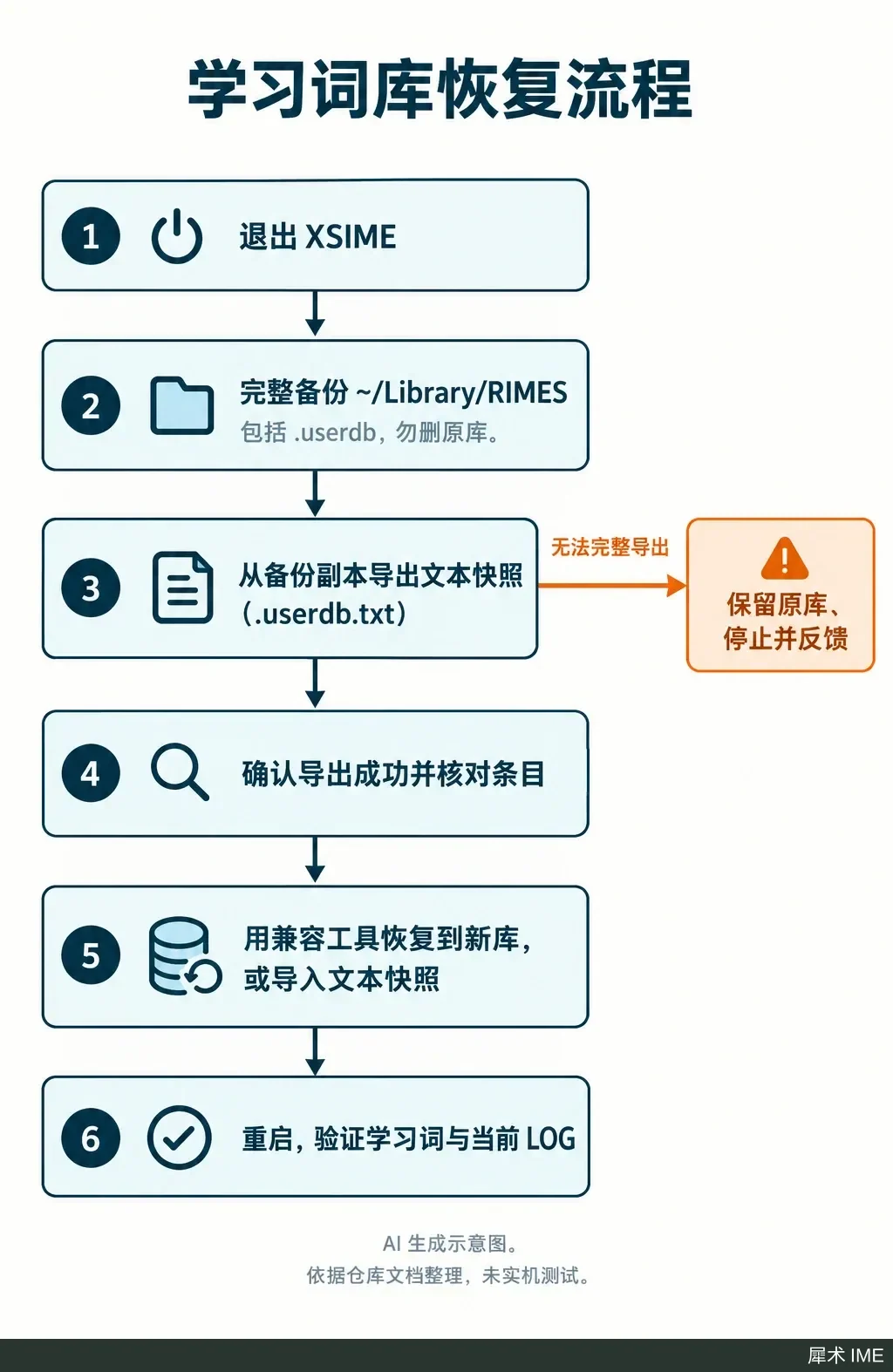
Quit XSIME first, then copy the entire ~/Library/RIMES elsewhere, including the troubled .userdb directory. Do not save only LOG, and do not treat deleting the database as recovery. Later attempts start from the backup copy; keep the original for further diagnosis.
2
Only consider import once the backup can be read. corrupted compressed block contents does not always mean the data is truly damaged. In the Issue #130 environment recorded by the recovery doc, an external tool had enabled Snappy compression while the IME runtime could not read that format; real corruption can produce the same line, so you cannot pin the cause from that log line alone.
- Find a tool that can read the original database normally, and export a Rime text learning snapshot (
.userdb.txt) only from the backup copy. - Confirm the export succeeded and check the entries, then restore into a new database with a tool compatible with the IME runtime, or import the text snapshot from XSIME’s learning-dictionary import entry.
- If you cannot export completely, stop recovery attempts and keep the original for further diagnosis. Empty candidates or an empty export do not prove the original data is empty.
- After restore, restart the IME, try words you know you learned, and check whether the current
LOGadds new errors. OldLOG.olddoes not participate in current alert judgment—do not treat history as a new failure.
The reporter in the doc recovered a snapshot by rebuilding an external librime tool with LevelDB that had Snappy off; that is that report’s result, not a repair command for every corruption. Prefer text snapshots for cross-tool migration; avoid copying binary databases whose compression setup is unclear.
3
When reporting, give environment info; do not publish personal dictionaries. For learning-dictionary issues you can provide: error class, XSIME version, names and versions of external tools used, and related dependency versions; when a binary userdb is involved, also check LevelDB compression capability of the tool versus the target IME. Versions or steps you cannot confirm should be written plainly as “unclear.”
Databases and learning snapshots contain personal input history—do not upload them directly to a public Issue. First provide redacted error information, and say whether a full export from backup succeeded and whether the current LOG still adds errors after restore, so maintainers can keep judging.
4
WeChat/QQ switch crashes: investigate on a different path. The input-source cache recovery doc records that the Issue #90 reporter, on macOS 27.0 (26A428) with App Store sandboxed WeChat 4.1.5 and QQ 6.9.93, hit host-app crashes when switching to RIMES 1.1.0; the stack included CFRelease(NULL). The reporter traced it to a stale input-source cache; maintainers have not independently reproduced this crash path, so the following are recovery suggestions only.
A 2026-10-09 doc update notes that maintainers verified the system-level cache-registration precondition with a sandboxed test process, and recorded installer registration changes after 1.1.1. The doc still lists as unconfirmed the result of actually installing a package that includes the fix via PackageKit—do not write “the crash is fixed” from that. The installer does not clear other apps’ caches; restarting the app, signing out, or successful registration cannot guarantee recovery. If you are on 1.1.1 or earlier, follow the original advice to look for a build that includes that registration fix; signing out and back in is also mentioned in the doc, but no controlled experiment was done on related cache timing.
If you need the per-app cache fallback, restrict it strictly to one already-broken app:
- Switch back to Apple’s input method or another healthy one, save unsent text, and fully quit the affected app.
- In an ordinary terminal of the current Mac graphical login user, run these read-only checks—no
sudo, root, or other user sessions:
id -u
stat -f '%u' /dev/console
getconf DARWIN_USER_CACHE_DIR
The first two outputs must match and must not be 0, or stop. The third is the current user’s cache root; open it with Finder’s “Go to Folder,” and enter only WeChat’s com.tencent.xinWeChat or QQ’s com.tencent.qq directory.
- Check only
com.apple.IntlDataCache.leandcom.apple.IntlDataCache.le.kbdx. The app directory must be a real directory; both files must exist at once as ordinary files; all three must belong to the current user and must not be symlinks. Usels -ldnto inspect type and numeric owner againstid -u; directory type should start withd, files with-, neverl. Missing files, wrong type or owner, or command errors: stop and file a redacted report on #90—do not change permissions or widen scope. - In the current user’s local directories create an empty backup folder and move those two files into it, keep original names, and record each original full path. Do not delete; do not use wildcards, recursive cleanup, or bulk scans; do not touch the whole cache root. If the first move succeeds and the second fails, stop immediately and keep what was already moved out.
- Reopen the same app, confirm unsent content is still there, and try switching once. The reporter said switching recovered after the app rebuilt the cache; maintainers do not guarantee other environments. If it still crashes, stop retrying, keep using another input method, and provide a redacted crash stack, macOS and app versions, and whether it is the App Store sandboxed build on #90.
To roll back: fully quit the same app first, back up the newly generated same-named files elsewhere, then put the original backups back at the recorded paths—do not overwrite or delete unrelated files. Keep backups until the app is confirmed healthy. This flow does not modify ~/Library/RIMES, schemas, the learning dictionary, app documents, or account data, and it does not replace the dictionary backup and restore above.
References
- Learning-dictionary anomaly prompts and recovery
- macOS 27: crash when switching input methods in specific apps
Assembled from the docs above at mounted-repo commit 7ef780d; not on-device tested. Issue #90’s description comes from that doc’s record and was not independently verified against the reporter’s environment.
References
-
Information compiled and published by the Scholay academic one-stop platform; report infringement for takedown.
-
Also published on Enter Scholar, a scholars’ community for the intelligent age